
Rigi24 AI Assistants — an intelligent assistant that helps you get work done
You do not need to memorise every menu and screen. Ask a question or give Rigi24 AI an instruction in natural language.

Rigi24 AI Assistant is not simply a chatbot that answers questions. It is designed as a digital operational assistant inside Rigi24. You can speak to it in natural language, ask for information or give it an instruction much as you would speak to a colleague.
You should not have to memorise every part of the software
A business platform can contain employees, customers, inventory, orders, bookings, invoices, loyalty, reports and many other workflows. Users should not have to remember the exact page, menu, filter or button for every task.
Tell Rigi24 what you need → receive an answer or proposed result → confirm when required → the supported operation is performed.
More than answering questions
A basic chatbot may explain where a feature is located. Rigi24 AI is intended to go further: understand the request, inspect permitted business data, explain the result and, where the relevant tool is available, prepare an operation.
“How much leave does Salome have left?” is a question. “Register leave for Salome tomorrow” is an instruction that changes data and may require confirmation.
HR and workforce management
Examples include: “Who was late today?”, “Who is on leave?”, “How many hours has Nika worked this month?” and “Who has unapproved overtime?”
A supported instruction could be: “Change Nika’s shift tomorrow to 11:00–19:00.”
Customer relationship management
Ask: “Find customers who have not purchased for three months”, “Who should we contact today?” or “Which customers need follow-up?”
Where supported, the assistant can also prepare a follow-up, reminder or other permitted customer-management action.
Inventory
Ask: “How many units do we have?”, “Which warehouse has this product?”, “Which items are running low?” or “Which stock is damaged?”
A supported instruction might be: “Transfer 10 units from the central warehouse to Branch 2.”
Online store and orders
Ask: “How many new orders are waiting?”, “Which orders are not prepared yet?” or “Which orders need redelivery?”
Where available, AI tools can prepare courier assignment, redelivery or manager-review actions.
Restaurant
Ask: “How many tables are active?”, “Which tables called a waiter?”, “What is the bill for table 12?” or “Which waiter handled the most orders today?”
Bookings
Ask: “What times are available tomorrow?”, “Which specialist is free at 15:00?” or “Show today’s bookings.”
A supported instruction might be: “Book this customer for tomorrow at 14:00.”
Invoices and finance
Ask: “Show unpaid invoices this month”, “How much does this customer owe?” or “Which invoices are overdue?”
Where permissions and tools allow it, the assistant can prepare invoice, payment or delivery-related operations.
Loyalty
Ask: “Which customers have the most points?”, “Which VIP customers have stopped returning?” or “How many active loyalty members do we have?”
Marketing
Ask: “Find customers who have not purchased for three months”, “Show our most active customers” or “Build a group of customers we have not contacted recently.”
Reports and management analysis
Ask: “Compare this month with last month”, “Which branch was busiest?”, “Which five days generated the highest sales?” or “Which products are at a critical stock level?”

Your access rights still apply
AI must not become a shortcut around security. If a user cannot view a salary, another department or a restricted document in Rigi24, the assistant must not disclose it either.
Sensitive changes remain under human control
Where confirmation is required, the workflow is:
request → data check → proposed operation → authorised confirmation → execution → audit history.
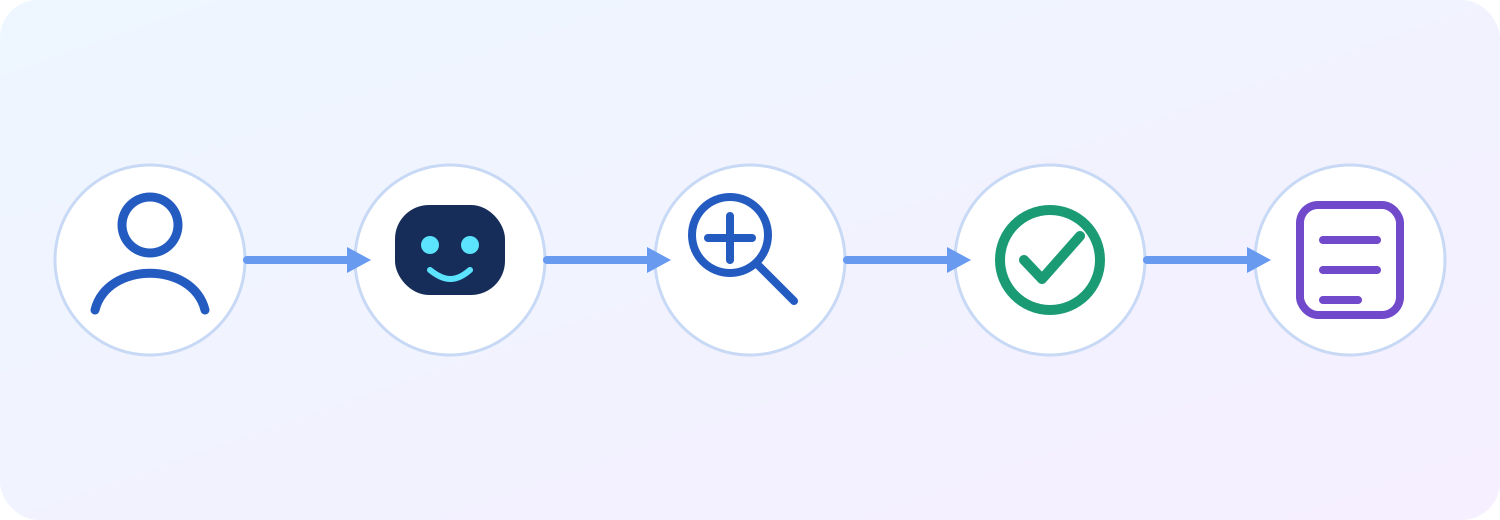
One approach across Rigi24
The architecture is not limited to HR. The same principle can be used across CRM, Inventory, Store, Restaurant, Booking, Invoices, Loyalty, Reporting and other Rigi24 modules.
The exact capabilities of each module depend on which AI tools have already been implemented and enabled.
The main idea
You do not need to memorise the whole application.
Tell Rigi24 AI what you want to achieve. It can interpret the request, find relevant permitted information, explain the result and, where a supported operation exists, help carry it out within your permissions and confirmation rules.
Rigi24 AI is not only there to talk to you — it is there to help you get work done.
Frequently asked questions
Is Rigi24 AI just a chatbot?
No. It is designed as an operational assistant for information, analysis and supported actions.
Do users need to learn every menu?
No. Natural-language interaction is intended to reduce the need to memorise software navigation.
Can AI bypass permissions?
No. The same user access rules must remain in force.
Can sensitive changes require confirmation?
Yes. Supported sensitive actions can remain subject to authorised confirmation.
Is AI limited to HR?
No. The architecture can extend across other Rigi24 modules.
 Practical inventory counting resourcesWarehouse Stocktaking and Cycle Counting: How to Resolve Inventory Discrepancies
 Employee communicationTeam Chat for Employees: Private and Group Messaging | Rigi24
 Tasks and remindersWorkspace and Task Management for Small Teams | Rigi24
 Related practical resourcesInventory Returns Management: Partial Returns, Damaged Goods and Stock Reconciliation